

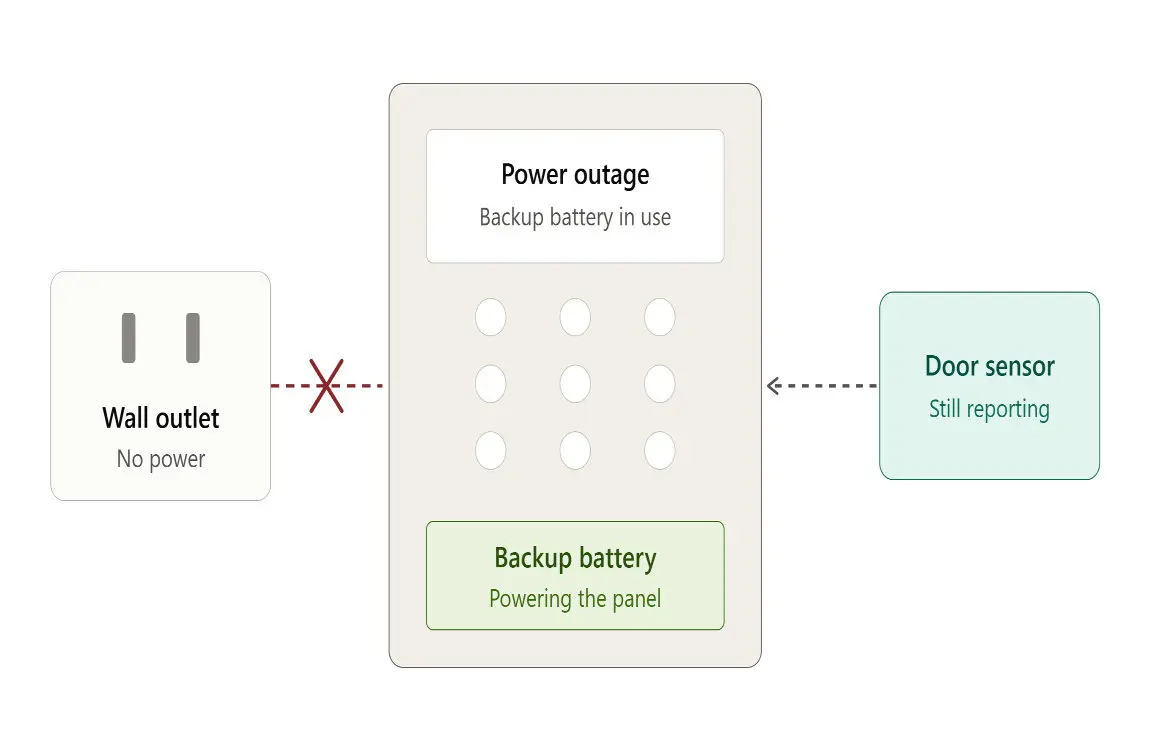
Backup power. The control panel (the “brain”) normally runs on household electricity through a transformer or power adapter. Alarm Grid explains that nearly every alarm system includes a rechargeable backup battery, that the transformer also keeps this battery topped up, and that the battery steps in when the power goes out. Without power, they note, an alarm system is effectively useless.
Will your alarm work without a battery? It depends on the type
Wired control panels with a plug-in transformer
This is the traditional setup: a metal or plastic panel in a closet or basement, a transformer plugged into an outlet, and a sealed rechargeable backup battery inside the panel.
Behavior without that battery varies by manufacturer and model. On many panels, the system may power up on transformer power alone but will report a “low battery,” “no battery,” or other trouble condition. Some models won’t start properly at all without a battery connected. Either way, nothing is there to carry the system through a blackout, and a panel that reports constant trouble tends to get ignored, which defeats the point of having an alarm.
If you’re unsure how your panel behaves, check the installation or user manual for your exact model rather than experimenting. Unplugging or disconnecting parts of a live alarm can trigger the siren or send a signal to your monitoring company.
Plug-in wireless base stations (Ring, SimpliSafe and similar)
DIY-style systems usually have a base station that plugs into a wall outlet and carries its own internal battery.
- Ring Alarm Pro: Ring’s support page says the internal battery can last up to 24 hours in Low Power Mode. In that mode the base station turns off most functions and Wi-Fi to save energy, though you can still arm and disarm, and with a compatible subscription it can signal the monitoring center if triggered. Ring also sells Power Packs, each rated for up to eight hours of extra backup.
- SimpliSafe: SimpliSafe’s support article says the base station’s rechargeable backup battery supply keeps it powered for up to 24 hours, and warns against putting regular single-use batteries in the base station because that can damage the device.
These batteries are built in as part of the design, so the “without a battery” scenario mostly applies when the battery has failed or been removed. In that case, the system runs only while the outlet has power.
Wireless sensors, keypads and key fobs
These cannot work without batteries, because the battery is their only power source. A door sensor with a dead battery cannot tell the panel that the door opened. Most systems warn you well before that point, so treat low-battery messages as real maintenance items, not nuisances.
Smoke and carbon monoxide alarms
Smoke alarms follow similar logic, with higher stakes.
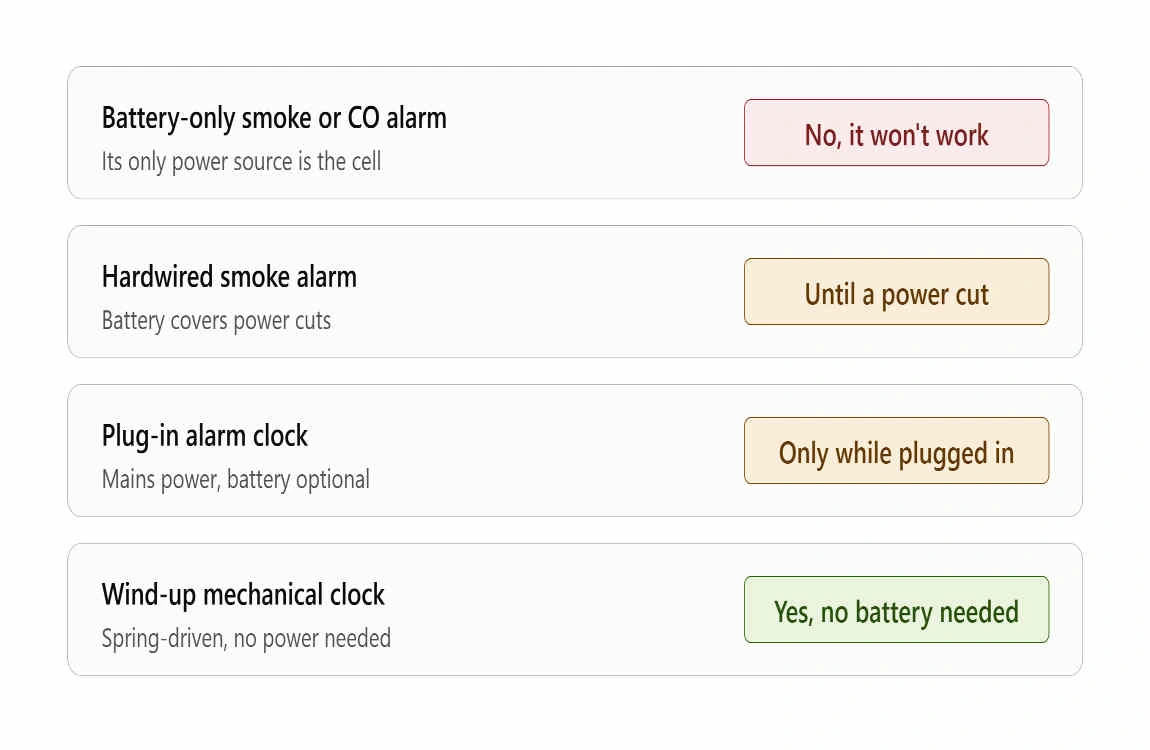
- Battery-only smoke alarms are dead weight without their battery.
- Hardwired smoke alarms with battery backup run on house power but need the battery to keep working during an outage. First Alert describes its hardwired models with battery backup as providing continuous protection during power outages.
- Sealed 10-year battery alarms have no replaceable battery; when the unit chirps for end-of-life, you replace the whole alarm.
The National Fire Protection Association (NFPA) says smoke alarms cut the risk of dying in a home fire in half. Safety tips from a UNC burn center page that summarizes NFPA guidance include testing alarms at least monthly, replacing batteries at least once a year (or right away when the alarm chirps), and replacing all smoke alarms when they’re 10 years old. Never pull the battery from a chirping smoke alarm and leave it that way.
At a glance
| Device | Works with no battery? | Works during a power outage? |
|---|---|---|
| Wireless door/window or motion sensor | No. Battery is its only power. | Yes, as long as its own battery is good, but the panel it reports to must also have power. |
| Wired panel with transformer | Model-dependent. Often runs with a trouble message; some won’t start. | No, unless the backup battery is healthy. |
| Plug-in wireless base station | Only while plugged in and powered. | Yes, for a limited time on its internal battery. |
| Battery-only smoke alarm | No. | Yes, on its own battery. |
| Hardwired smoke alarm with backup | Yes, on house power only. | Only with a working backup battery. |
What really happens to your alarm in a power outage
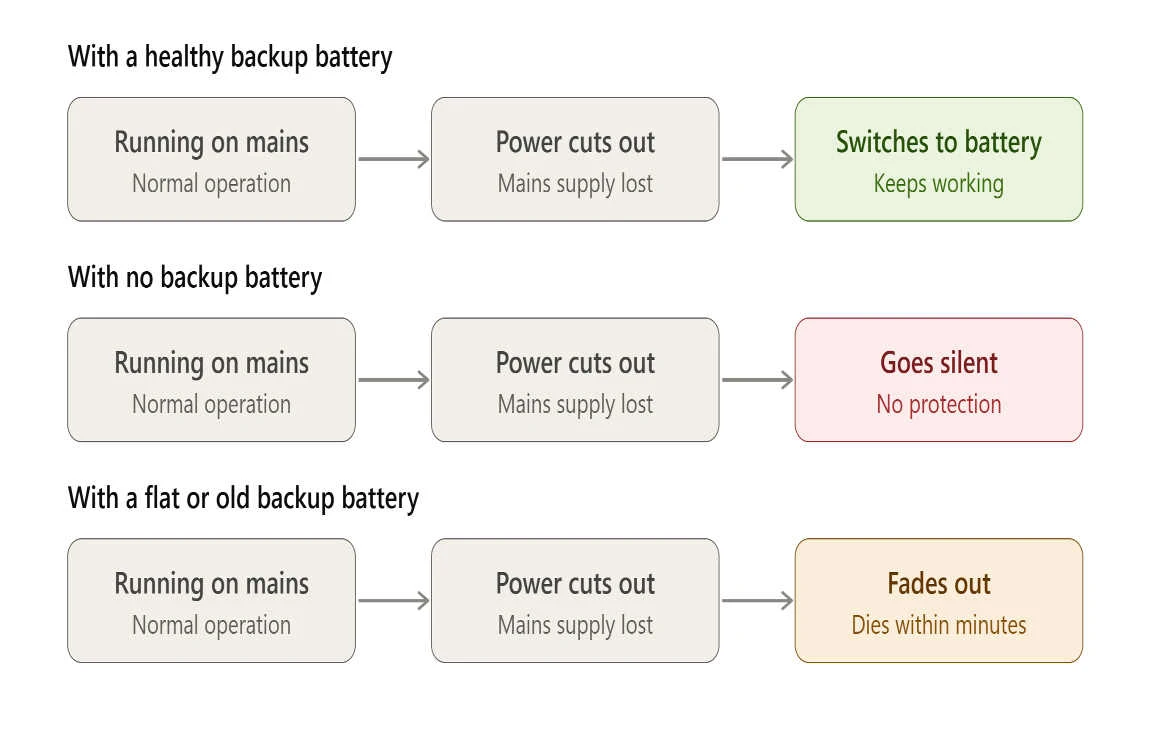
Manufacturer claims describe best-case conditions. Here’s what to expect in practice.
The backup is temporary. Alarm Grid notes that a backup battery won’t run indefinitely and will need to be replaced every few years. Battery capacity fades with age, so a battery that once lasted a full day may last a fraction of that.
Real-world runtimes can fall short. In a Ring community thread, a customer reported their base station died after about two hours in an outage. A Ring representative replied that it sounded like a battery problem and suggested contacting support. That’s one customer’s experience, not a guarantee, but it’s a good reminder to test your backup instead of trusting the box.
Features get switched off to save power. As Ring’s page above explains, Low Power Mode turns off most functions and Wi-Fi. If you rely on app alerts, those may stop even if your router has its own backup.
Monitoring depends on the communication path. If your router loses power, a Wi-Fi-only alarm can’t reach the cloud. Alarm Grid says cellular communication is the only reliable way to keep an alarm system monitored when electricity is out, which is a retailer’s view worth weighing against your own setup. Ring and SimpliSafe both describe cellular backup that requires a compatible subscription or monitoring plan.
Long outages can outlast any battery. After a day or two without power, even a healthy backup is spent. If you live somewhere with frequent storm outages, plan for that, not just the first few hours.
Should you ever run an alarm without its backup battery?
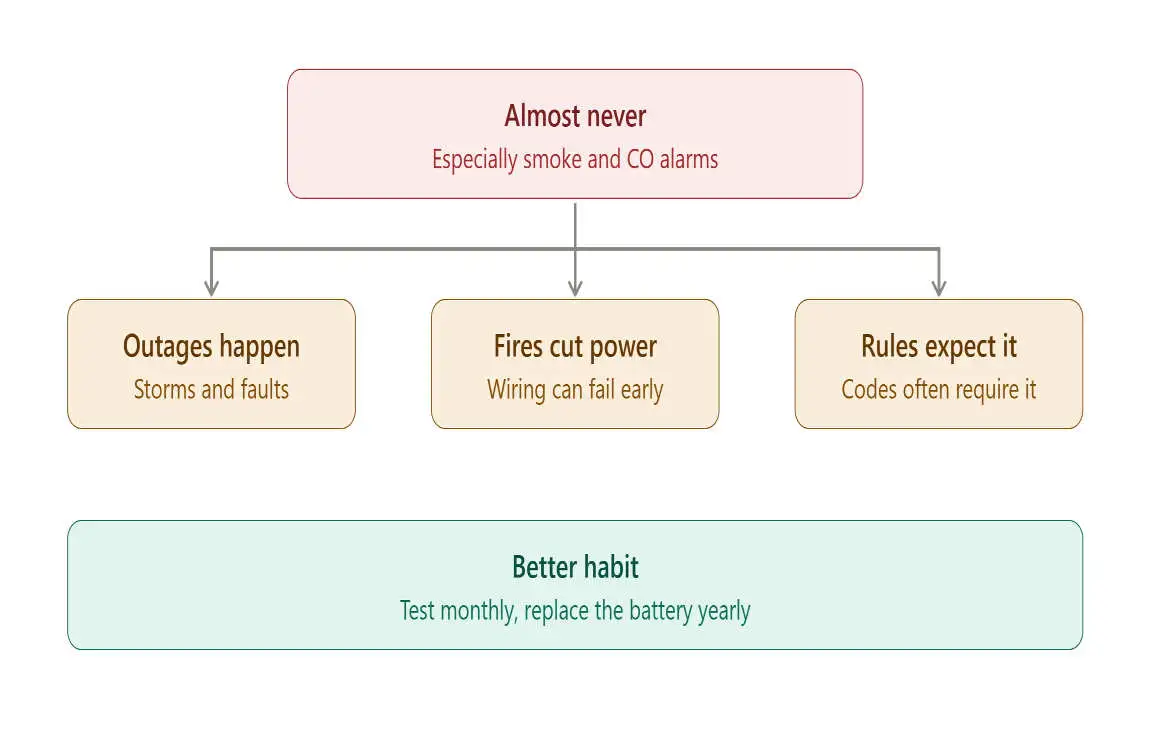
Only briefly, and only if you understand the trade-off. If a replacement battery is on its way and your system runs on plug-in power in the meantime, that’s a short-term compromise rather than a setup.
Pros
- The system may keep running on house power while you wait for a replacement.
- It can stop a failing battery from triggering repeated trouble beeps while you sort out a fix (check your manual before assuming this).
Cons
- No protection during a power outage, including one that’s deliberate or caused by a tripped breaker.
- Many systems will flag a missing battery as a trouble condition, and some won’t run properly at all.
- Monitoring signals may not go out if power drops at the wrong moment.
- For smoke alarms, it’s simply unsafe. NFPA tip sheets advise against disabling smoke alarms even temporarily.
Signs your alarm battery needs attention
- Repeated chirps or a “low battery,” “AC loss,” or “system trouble” message on the keypad.
- The system shuts off quickly or resets during short outages.
- The battery is several years old. Alarm Grid says backups need replacing every few years, and many installers use three to five years as a rule of thumb. Your manual is the final word.
- A bulging, leaking, or warm battery. Stop using it and replace it right away.
- Sensor batteries flagged as low. Replace them promptly, and consider replacing the others at the same time if they’re the same age.
How to replace a control panel backup battery safely
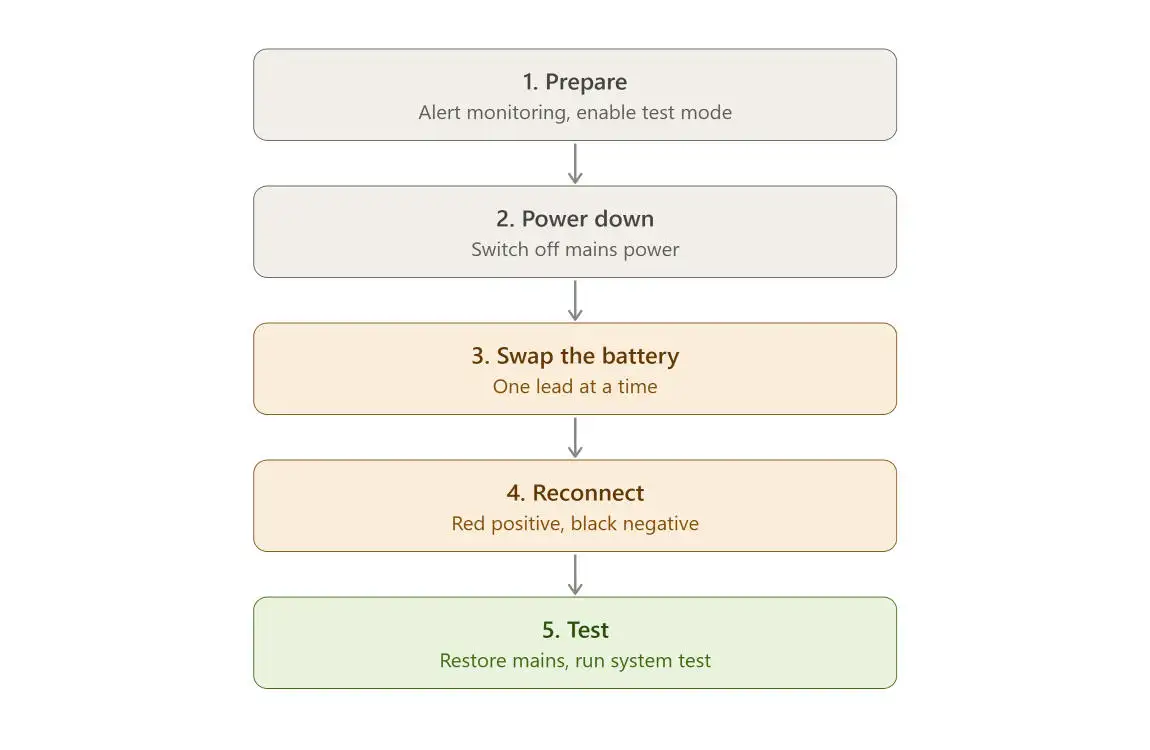
Every system is a bit different, so treat these as general steps and follow your own manual first. If your system uses a sealed internal battery (as Ring’s base station does), contact the manufacturer rather than prying it open; Ring’s own staff direct customers with battery problems to support in the thread above.
- Read the label and manual. Note the voltage, capacity (amp-hours), and battery type. Use the same type; don’t swap chemistries.
- Tell your monitoring company. If your system is monitored, put it into test mode or let the company know, so you don’t set off a false dispatch.
- Disarm the system. Many manuals also tell you to unplug the transformer before touching the battery. Follow yours.
- Open the panel and disconnect the old battery. Note which lead goes where (typically red is positive and black is negative) and take a photo before you start.
- Connect the new battery, restore power, and test. Trouble messages can take time to clear while the new battery charges. If they persist after your manual’s stated charge time, contact the installer or manufacturer.
- Recycle the old battery. Sealed lead-acid and lithium batteries shouldn’t go in household trash. Most battery retailers and household hazardous waste programs take them.
Keep metal tools and jewelry away from the terminals; a shorted battery can get hot fast. If you aren’t comfortable opening the panel, have your installer do it.
What does it cost?
Backup batteries are generally a small expense compared with the system itself, but price depends on battery type, capacity, and brand. Check the label on your current battery and compare current retail prices for an exact match. Beware of prices that look too good; a cheap, off-spec battery defeats the purpose.
How to make your alarm more outage-proof
- Test the backup once a year. With your monitoring company’s OK, briefly cut power to the panel and see how it behaves.
- Add extended backup where it’s supported. Examples include Ring Power Packs, which Ring says provide up to eight hours each.
- Protect your router and modem too. A Wi-Fi alarm is only as connected as your internet. A small battery backup for the router can keep notifications flowing, but confirm compatibility with your alarm maker.
- Use cellular backup or monitoring if you rely on it for emergencies.
- Keep spare batteries of the correct type for sensors and smoke alarms.
Frequently asked questions
Can I run my house alarm on AC power only?
Sometimes, but it varies. Some panels run on the transformer alone and report a trouble condition; others won’t start without a battery. Even when it works, you lose outage protection. Check your manual.
Will my alarm go off if the backup battery dies?
Usually a dead or missing backup battery triggers trouble beeps or a keypad message, not a full alarm. A siren can still sound if the system is triggered while power is out and the battery is unable to support it, or when power returns and the system logs events. Behavior depends on the system.
How long does a home alarm battery last in a power outage?
Manufacturers such as Ring and SimpliSafe say up to 24 hours for their base stations, and Ring says that’s in Low Power Mode. Real-world results vary with battery age, features in use, and the number of sensors. Older batteries last less.
Do wireless alarm sensors need batteries?
Yes. Wireless sensors use their own batteries as their main power source, and the system will typically display a trouble condition when one gets low.
Does a hardwired smoke alarm work without a battery?
It can on house power, but it won’t work during an outage unless the backup battery is working. Because fires sometimes coincide with power loss, keep the backup battery fresh and follow NFPA-based guidance: test monthly and replace the alarms every 10 years.
Will my alarm still contact the monitoring center during an outage?
Only if the communication path stays alive. Wi-Fi-only systems can lose connection when the router loses power. Cellular backup helps, but it requires a compatible plan and a powered base station.
